

When a shrink line starts producing uneven wraps, the heater often gets the blame, yet the conveyor belt that carries every pack through the heat is just as likely to be the cause.
Keeping a Belco tunnel running well means paying attention to the belt, the chain that drives it, and the heat and airflow around it. This guide explains how these machines work, which signs point to a worn belt, how to decide between repair and replacement, and how to order the right replacement without delay.
How the Machine Works
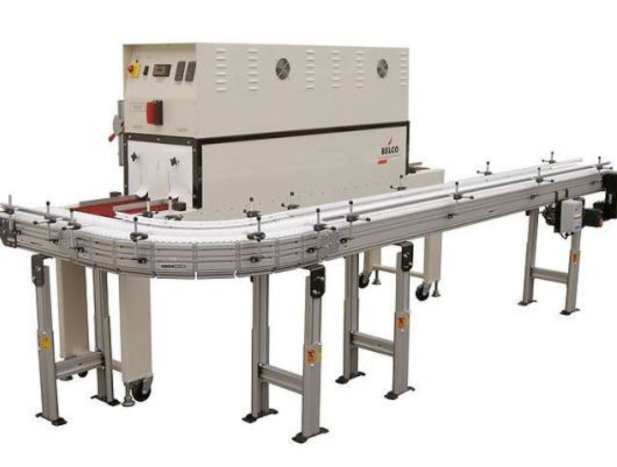
Belco Packaging Systems builds shrink tunnels that wrap film tightly around products as they travel through a heated chamber. Its fan models use heating elements and adjustable-speed fans to heat and swirl air around the package, while recirculating and high-speed recirculating versions move air more thoroughly for demanding jobs. Digital controls monitor temperature, conveyor speed, blower airflow, and dwell time, and the company lists production speeds from about 5 to 40 packages per minute for its standard tunnels, depending on package size and the model.
On a Belco tunnel, the belt is the part that touches every product, so its condition affects spacing, dwell time, and the finish of the shrink.
Belt Types
Packaging tunnels generally use one of three belt styles:
1. PTFE mesh: an open weave that lets hot air pass through, which suits ovens that rely on circulating airflow.
2. Silicone-coated glass cloth: a solid surface that supports small or lightweight items.
3. Metal belts: durable mesh designs for heavy products or higher temperatures.
Knowing which type your machine uses matters when ordering, because belts differ in width, length, weave, and fastening.
Signs of a Worn Belt
Check the belt on your Belco tunnel on a regular schedule. Warning signs include:
1. Frayed or cut edges, stretched links, or melted strands.
2. Tracking drift, where the belt walks to one side.
3. Surging or stuttering movement, often caused by chain stretch or sprocket wear.
4. Packs sticking to the belt because of melted residue.
5. Uneven shrink across the tunnel width, which can point to belt or heater problems.
Maintenance guides suggest weekly checks for belt wear and tension, and some set a rough threshold of about 1.5 percent elongation as a point to consider replacement. Treat these as guidelines and follow the manual for your model.
Repair or Replace
A Belco tunnel belt that is simply tracking off often needs only a tension adjustment, realigned sprockets, and cleaning of melted residue. Replace it when links are stretched, several strands have melted, or the belt no longer tracks after adjustment. A worn belt creates uneven dwell time that temperature changes cannot fix.
Order the Right Part
Accurate information avoids returns and downtime. Before ordering a replacement for your Belco tunnel, gather:
1. The model and serial number from the machine plate.
2. The belt type and material.
3. Width, length, and, for mesh, the weave or pitch.
4. The type of connector or fastening.
5. A photo of the old belt and the drive area.
If you are not sure, measure the belt with the machine cool and send the measurements and photos to the supplier before you buy.
Keep Spares and Maintain Daily
For a Belco tunnel, fast-wearing packaging equipment parts such as belts, heating elements, and fan bearings are worth keeping on the shelf, since a small part can stop a full line. Daily, wipe the conveyor and clear film scraps. Weekly, inspect the belt, clean air vents and filters, and check chain tension. Lubricate drive chains with a heat-resistant lubricant at the interval in the manual, which some guides put at 250 to 500 operating hours. Scrape melted plastic from the mesh only when the machine has cooled, using a plastic tool and never a sharp metal blade.